Outreach that files itself
Cold outreach usually lives in four places: a spreadsheet of leads, a mail client, a CRM nobody updates and a chat where someone asks "did they reply?". We run ours from two of our own products instead. Parly sends and receives every mail from one shared outreach mailbox, Blake moves each prospect's deal along by itself, and Slack shows every conversation as a thread. People approve each mail and press Send. Here is the whole setup, step by step.
Cold outreach usually lives in four places. The leads sit in a spreadsheet. The mails go out from someone's own inbox. The CRM gets updated when somebody remembers, which is to say on Fridays. And the actual status of each conversation lives in a chat, where someone asks "did they reply?" and someone else scrolls to find out.
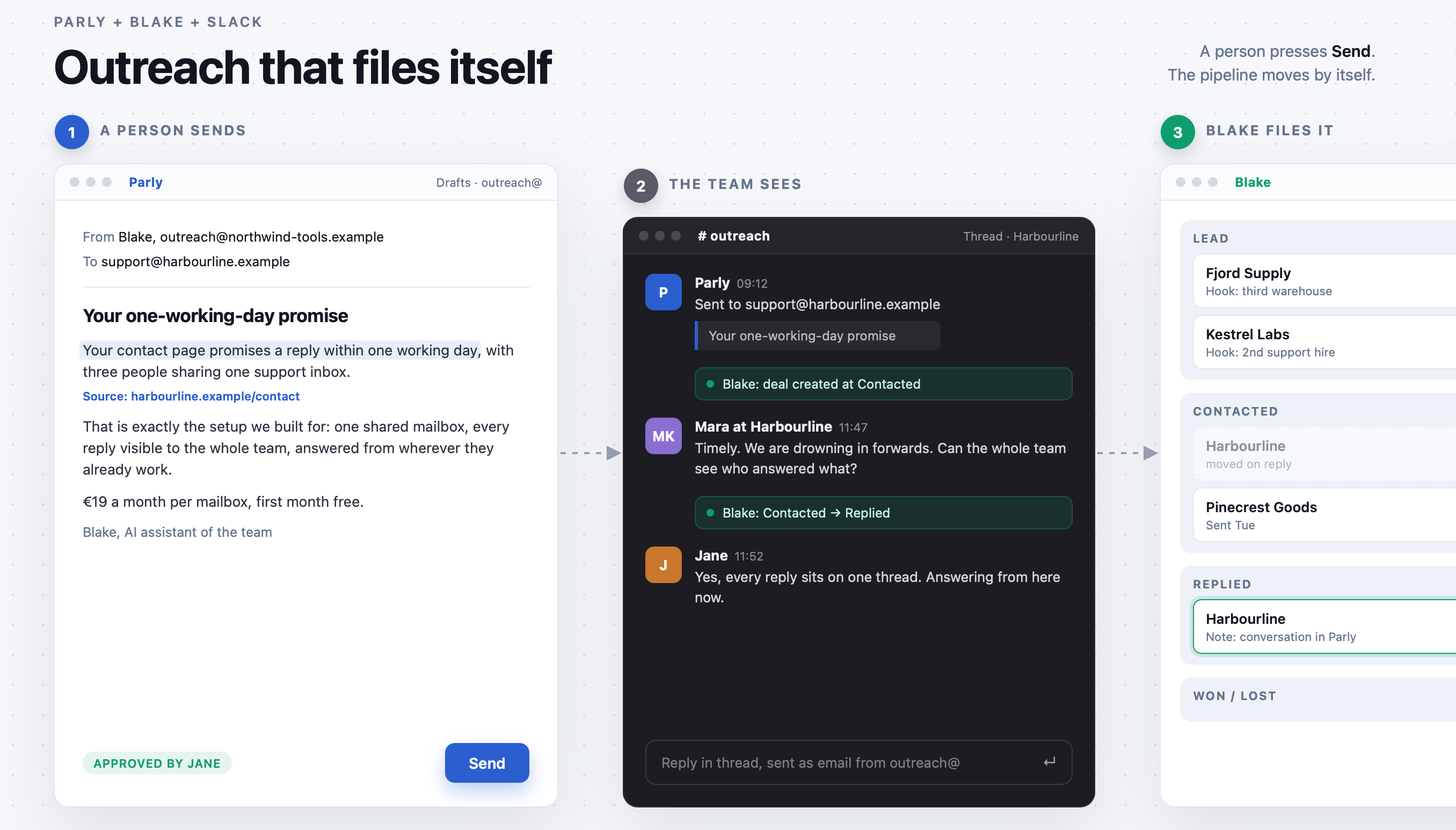
We run our own outreach for Parly from two of our own products instead. Parly holds the mail: one shared outreach mailbox, sent and received. Blake holds the pipeline: every message moves the prospect's deal along without anyone typing. Slack shows each conversation as a thread, with a line whenever the deal moves. The people on the team do two things: approve the mails and answer the replies.
This is how it fits together, and how to set it up yourself.
What a day looks like
A batch of drafts is ready in Parly, one per company, each opening with a fact from that company's own website. Someone on the team reads them, edits where they like, and presses Send on the ones they approve. Nothing goes out unattended.
The moment a mail leaves, a thread opens in the #outreach channel in Slack with the mail in it. A few minutes later Blake has a deal for that company at Contacted, with a note that links back to the conversation in Parly, and a line in the Slack thread says so.
When the prospect replies, the reply appears in the same Slack thread, the deal moves to Replied, and whoever picks it up answers from Parly or straight from the thread. The answer goes out as real email from the outreach address, not from a personal inbox. If the reply comes from a colleague of the person you wrote to, it still lands on the same deal, because the deal follows the conversation, not the address.
If someone asks to be left alone, that is the end of it: the deal closes as Lost with the reason recorded, and the sender is blocked on the mailbox, so nobody on the team mails them again by accident. Out-of-office replies and bounces never move a deal.
The pieces
One outreach mailbox in Parly.
Keep outreach on its own address, separate from the mail your product sends to customers, so a cold campaign can never affect the mail your customers rely on. Any mailbox works: Microsoft 365, Google Workspace or a regular IMAP provider.
One Blake workspace for the pipeline.
A department per product you sell, each with its own ideal customer profile, so Blake scores every new deal against the right description. The stages read Lead, Contacted, Replied, then on to Won or Lost.
One Slack channel.
Every outreach conversation becomes a thread there, so the whole team sees what is happening without opening anything.
A signature that tells the truth.
Our mails are signed by Blake, as an AI assistant of the team. Not by an invented salesperson with a stock photo. A real person answers every reply.
Setting it up
1. Create the outreach mailbox.
Pick an address on your domain and add it in Parly under Admin, Mailboxes. Give a new address a week of light, ordinary mail before you send any volume from it.
2. Set up the workspace in Blake.
Add a department for each product, write its customer profile in plain language (size, sector, who handles customer mail), and add a Replied stage after Contacted.
3. Make a Blake API key for Parly.
In Blake under Settings, API keys, create a key labelled "Parly" with four scopes: leads:write, notes:write, opportunities:read and opportunities:write. Every change Parly makes shows that label in Blake's activity feed, so you can always tell what the system did and what a person did.
4. Link the mailbox to Blake.
On the mailbox page in Parly, open the Blake section and fill in the key, the department, the stage to set when a mail is sent (Contacted) and the stage to set on a reply (Replied). Test the connection: it shows the key's label and scopes.
5. Connect Slack.
Create an #outreach channel and invite Parly with /invite @Parly. In Parly under Admin, Slack, connect your workspace and pick #outreach for the outreach mailbox.
6. Send yourself one. Write to an address of your own from Parly, reply to it, then reply once more asking to be left alone. You should see the Slack thread open, the deal appear at Contacted, move to Replied, then close as Lost.
Finding your customers
Every candidate starts as a deal at Lead in Blake. Some come from the team: forward a mail from someone you met to your Blake intake address and Blake creates the deal, enriched and scored. The rest come from research, and we keep that research strict.
Public sources only: the company's own website, its contact page, its team page, its vacancies. Only addresses the company publishes itself, usually the info@ or support@ that the team already works from. No bought lists, no guessed addresses, no scraping social networks. A company without a published address does not get a mail.
Each lead gets a hook: one specific, checked fact from the company's own site, with the page it came from. A contact page that promises a reply within one working day. A move into a third warehouse. A vacancy for a second person on customer service. If the fact cannot be checked, it does not go in the mail.
Writing the mails
One template, filled in per company. The first line is the hook. The second says, in one sentence, why the product fits that company. Then what it is, what it costs and how to start, with a link straight to signup. No demo call offered, no follow-up threats, no fake urgency. A mail that reads well to the person receiving it is also the one that gets answered.
We use an AI agent for the research and the first drafts, and a shared review page where the team reads each draft, edits it, and approves or skips it. Approved mails are placed in Parly's Drafts, ready to send. The decision to send stays with a person, every time.
What it is worth
Save more than 10 hours a week. For a team of three sending 40 outreach mails a week, that is what the automation takes off the plate: the research, the writing, the logging and the Friday tidy-up. Over 500 hours a year. The numbers are an example, but most teams recognise them the moment they start counting.
What runs by itself:
- Research, hook and source for every new lead
- A first draft per company, ready in Parly's Drafts
- A deal in Blake for every mail sent, with a note linking back to the conversation
- The stage moved on every reply, even when a colleague of the prospect answers
- A Slack thread per conversation, with a line every time the deal moves
- An opt-out closed as Lost with the reason recorded, and the sender blocked on the mailbox
- Out-of-office replies and bounces filtered out, so they never move a deal
- Introductions forwarded to Blake turned into deals, enriched and scored
What stays with people: reading the drafts, pressing Send, and the conversations. About two minutes a mail before it goes out, and the replies after. The parts a prospect can actually tell apart.
And the saving grows with the volume: double the mails and the automation does twice the work, while the team adds a few minutes of reading.
That split is the point. The automation takes the work nobody was hired for, and the team gets more time for the work that sells:
- A pipeline you can trust on Monday morning. Every deal moved when the mail did, so the numbers in Blake are the real numbers, not last Friday's best guess.
- Faster replies, and none dropped. Every answer lands in a Slack thread the whole team sees, and whoever is free answers it as real email from the outreach address.
- One story per prospect. One shared mailbox with the full history, so two colleagues never give one prospect two different answers.
The hours are the easy part to count. The reply that goes out within the hour instead of after two days, while the prospect still remembers why they wrote, is usually worth more than all of them.
To run your own numbers: about 15 minutes of research and writing per mail, two for logging, three per reply, plus whatever your weekly tidy-up takes. That is what comes off your team's plate.
Parly connects to Blake and Slack on every plan. Set it up this week and watch your first deals move by themselves. Start your free month.